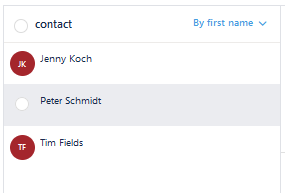
After you have created a group, you can add contacts.
To do so:
1. Select the contacts you wish to add to the group clicking on the initials (if you click on the name only, you will open the contact details). You can select more than one at a time.
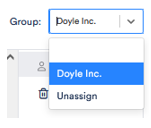
2. Now go to Group in the top right-hand corner, open the drop-down menu and select the group to which you want to assign the contacts.
3. If you wish to assign a contact to another group than the one it is assigned to currently, you can change this in the same way. If you do not want this contact to be assigned to a specific group, select Unassign.