With Aktenplatz, you can invite your colleagues to a project and share its files with them. This way you can make important information and materials directly accessible to them via digital files. If necessary, you can also invite people from outside the company as guests to your projects.
There are two easy ways to add people to a project. Both have the same effect. So just use the one that seems more practical to you. See also the explanation of user groups at the end of this article.
To share a project via Board View:
1. Click a project to be shared.
The items of the selected project display.
2. Click 
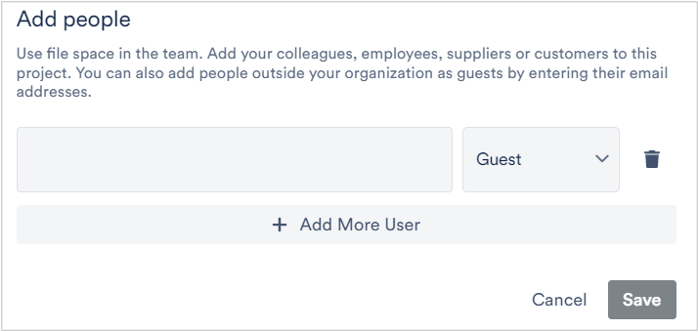
The Add People dialog displays.
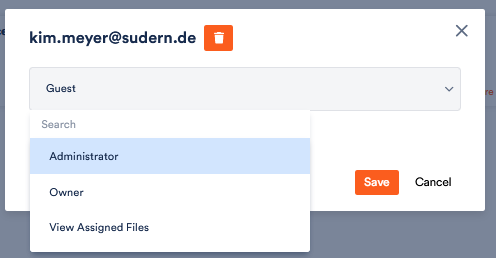
3. Specify the Email address of the person to whom you want to share the project’s space and decide whether you want to invite them as guest, admin or only to view their assigned files.
4. Click Add More User in case you want to share the project’s space with multiple persons.
5. After specifying desired person(s), click Save.
An invitation will be sent to all email addresses you specified.
The recipient(s) would receive the following email:
6. If you get such an invite, click Accept Invite to accept the invitation.
Once a recipient accepts the invitation, he/she would be navigated to the Aktenplatz application where he/she would be able to access the shared project.
Add users via the project settings:
1. Open the project and click on Users in the project settings (
2. Click on the 
3. You can also specify which authorisations a user should have, for example whether they can change project settings or only edit files that have been assigned to them. To do this, click on the user and select from the drop-down menu:
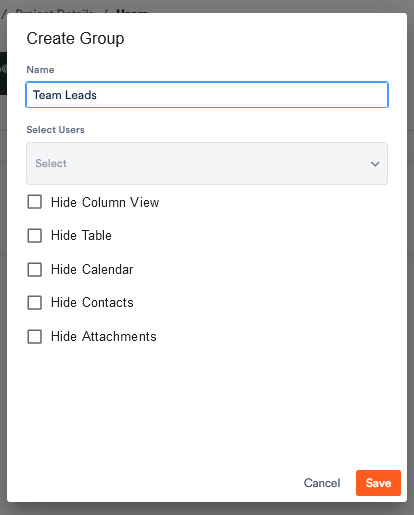
In the project settings you will also find the function to create user groups.
1. To do so, click on Create group. Enter a name, add users and restrict the usage rights of the group members if required.
The user groups become relevant, for example, if you want to specify which group can view which appointment categories or if you want to share files.