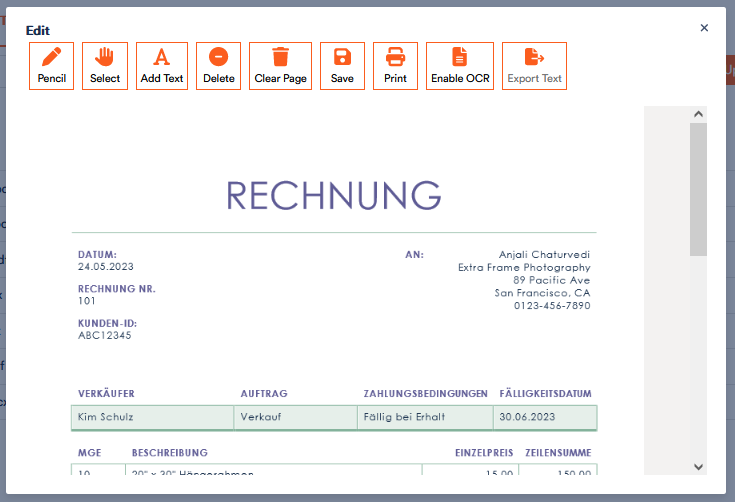
You have the option of working with pdf files directly in the Aktenplatz app in various ways.
To do so,
1. open a pdf file in Aktenplatz.
A preview of the file appears in which you can already work.
2. Edit the pdf file in Aktenplatz:
You have various functions to work with pdf files directly in Aktenplatz.
 to activate the function that allows you to mark places in the pdf and sign documents freehand. Hold down the mouse button at the desired position to place the pencil and move it as desired. Click on the symbol again to deactivate the function.
  . The shape of your mouse does not change, unlike for the pencil function. But you can draw a text field as usual. To do this, hold down the mouse button, move it a little and then release it. Enter your text in the text field and move it to the desired position on the page.
  and click on the desired element. You can now drag it to the desired position.
 and confirm the delete command. You can delete drawings and text fields even after you have saved and closed the file.
  . The pdf page will not be deleted.
3. Save or print a file:
Unlike with other Office integrations in Aktenplatz, your added text fields and drawings are not automatically saved. Click Save to save your changes.
If you want to print the file, select Print and a dialogue box will open.
If you want to use OCR recognition, see the tutorial Using OCR.