OCR stands for Optical Character Recognition and allows you to automatically recognise text in images and pdf files, for example. This is very practical if, for example, you have an invoice in pdf format but need it as an Excel or Word file to make changes. In this case you can export important contents.
To use OCR recognition, proceed as follows.
1. Open the pdf file.
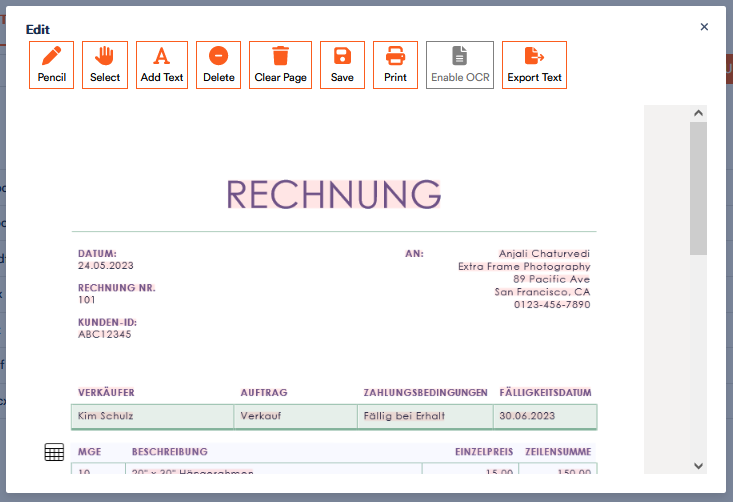
The file preview opens. In the bar at the top you will see your options.
2. Select Enable OCR.
The text is now highlighted, the Export Text field can now be used and the 
By clicking on Export Text, you can download the text contents of the files as an unformatted txt file.
4. Click on the
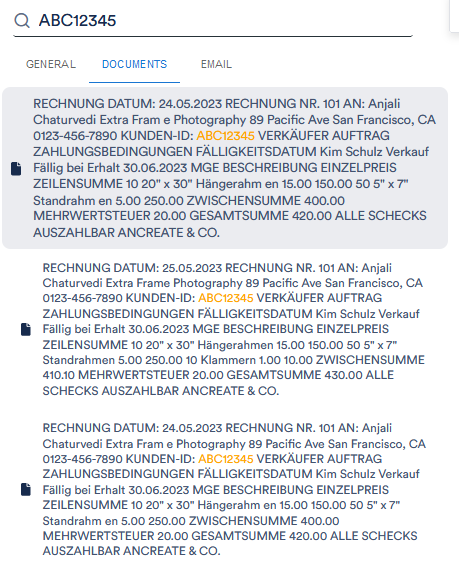
5. You can now also search for customer data that the OCR has captured in your other documents in Aktenplatz. To do this, select the element you want to search for, for example the customer number, simply by clicking on it, close the file and insert your search term in the search bar. You will find this in the dark grey bar on the left-hand side.
Click on Documents and all files in which the client number was found will be displayed:
The search only includes pfd files in which OCR recognition has already been activated.