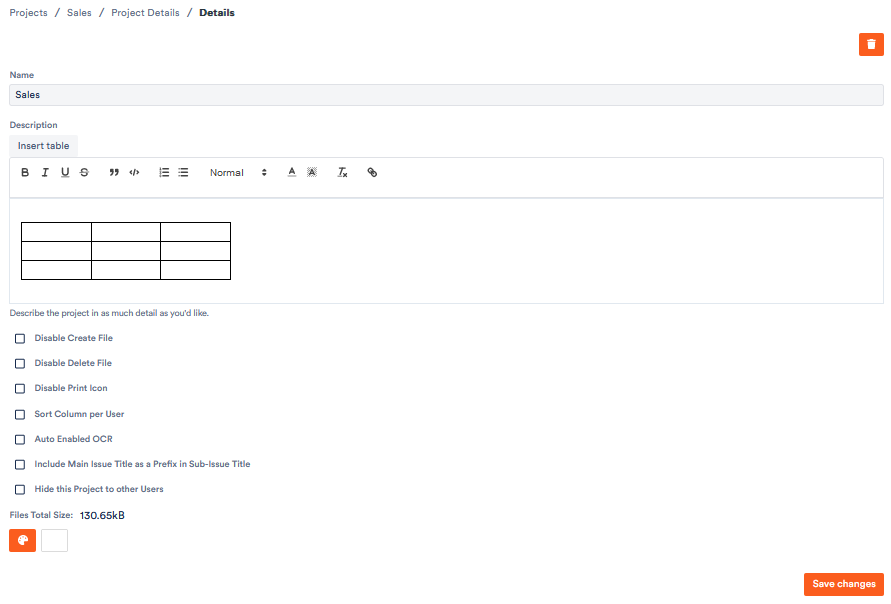
On the Details page of the project settings you set your project's basic data and control various project features. Aktenplatz describes it there as: „Here you set the project's basic data: name, description, default view and file color. You can also toggle features such as disabling file creation, deletion or printing, automatic OCR, file versioning and the project's visibility."

Open the details page

Open the project settings via the gear icon and click Details on the left under General.

Basic data

  • Name and description of the project (the description can be formatted and include tables).
  • Default view – defines which view is shown by default when the project is opened.
  • File color – the colour used to mark the case files in this project.

The feature toggles (checkboxes)

  • Disable Create File – prevents users from creating new case files in this project.
  • Disable Delete File – prevents case files from being deleted.
  • Disable Print Icon – hides the print/label icon on case files (no QR/label printing).
  • Sort Column per User – lets each user sort the column order individually instead of a single project-wide order.
  • Auto Enabled OCR – automatically runs text recognition (OCR) on uploaded documents so their content becomes searchable.
  • Include Main File Card Title as a Prefix in Dependency Title – automatically prepends the parent case file's title to linked or sub case files.
  • Hide this Project to other Users – makes the project visible only to you; other users won't see it in their project list.
  • Enable File Card Versioning – keeps earlier revisions when files change, so they can be restored (the basis for file versions).
  • Larger Text – shows text (e.g. in the task bell) in a larger font.

Save

Click Save changes for the settings to take effect.